

Welcome back
Its been a while, from my last article which was written back in 2016. Lot more has changed since then, I have completed few information security certifications started doing a day job and other things. Resuming my blogging was in my to-do list from very long back. So here goes something…
Where do we stand now?
Before we start with anything, I want to set the stage so as to understand where are we heading now. As information security professionals we have seen different types of vulnerabilities and what not. Following is a little diagram which will help us understand what are we trying to learn.
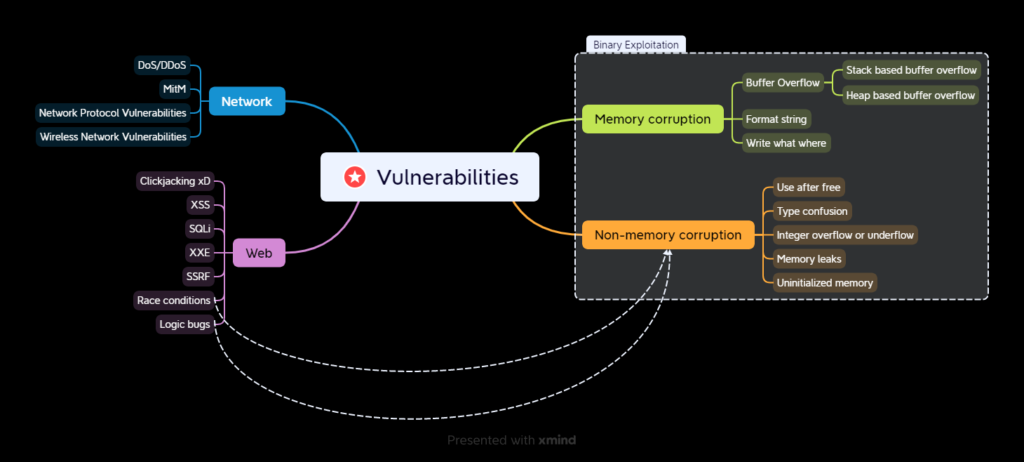
From the above diagram we can get a hint about what are we going to deal with.
Binary exploitation
Binary means a set of 2 choices like on/off, 0/1, true/false, etc. In the world of computers principal of binary is at its heart. Binary is used for everywhere in computers from basic mathematics to complex weather predictions.
But here binary signifies Binary file something which is computer readable file which consists of instructions for the computer to execute. Sometimes its also called as executable file referring to but not limited EXE(windows) or ELF(*nix) more examples can be found here.
What is Memory corruption?
Memory corruption is a class of vulnerability which is mainly caused due to programming errors. Causing the program in execution state to display an unintended behavior, crash or even code execution.
What is a Program
A program is a set of instructions written in a programming language like C/C++, Java, Rust, Python, etc. Its human a human readable language, containing set of instructions for the computer.
Doesn’t that makes a program and binary similar? Like both contains instructions for computer to execute ? Nope. Well a program is something what a human can read and write, we cannot do the same with binary.
A program can be complied or interpreted based on the language.
Compilation
Compilation is a multi stage process which transforms a source code to a executable binary. On a higher level the whole process can be broken down into following steps w.r.t. C/C++ programming language.
- Preprocessing: A source code may contain different instructions for the preprocessor like
#defineor#includethe preprocessor will go ahead and process those. Like for#includeit would go ahead and include the defined header file into the source code or for#defineit would expand the macros defined. - Compilation: It takes preprocessor output performs error checking, generates assembly code and then generates object files. The compiler also performs code optimizations trying to improve the performance and reduces the size.
- Linking: For each source file one object file is generated now each of them is combined to single executable file.
Memory
In very simple terms memory is used for storage of data, be it a movie, song or a game. But there are 2 main types of memory storage’s in computers Volatile and Non-Volatile.
Volatile: Refers to temporary storage like RAM, CPU registers, cache, etc.
Non-Volatile: Mainly used for storage purpose includes HDD, SSD, etc.
A executable is stored in non-volatile memory on the HDD but when its executed a copy of it is generated in the volatile memory in the RAM. After the execution the program comes to life it performs numerous operations under the hood. More about the memory structure of a program will be covered later in this articles.
Registers
Registers/CPU registers are stored inside the CPU making them fastest memory storage. This registers are categorized into general purpose, segment registers and flag registers. Well there are many more categories but we will only stick to these. Further more following are the general purpose registers which are more important to us.
| 64-bit | 32-bit | 16-bit | Description |
|---|---|---|---|
| RAX | EAX | AX | Accumulator |
| RBX | EBX | BX | Base |
| RCX | ECX | CX | Counter |
| RDX | EDX | DX | Data |
| RSI | ESI | SI | Source |
| RDI | EDI | DI | Destination |
| RSP | ESP | SP | Stack Pointer |
| RBP | EBP | BP | Stack Base Pointer |
| RIP | EIP | IP | Instruction Pointer |
Stack
Stack provides static memory allocation to a process. There are 2 basic operations which can be done on a stack i.e. PUSH and POP, for which it makes use of the Stack Pointer and Stack Base Pointer registers from the above table.
Buffer overflow
Before understanding what is “buffer overflow”, lets first try to understand What is a buffer?
A buffer is a temporary storage, which can be used for storing user input or any data used for processing. Following is example buffer being used, which copies input from the command line argument to the buffer “user_name” using strcpy function and prints it.
#include<stdio.h>
#include<string.h>
 // gcc file_name.c -o sayhello
int say_hello(char * argument) {
  char user_name[16]; //allocating buffer
  strcpy(user_name, argument); //copy data using strcpy
  printf("Hello %s\n", user_name);
  return 0
}
int main(int argc, char * argv[]) {
  say_hello(argv[1]);
  return 0;
}
So now coming back to What is buffer overflow? Simply saying its a direct or indirect process of writing data beyond the buffer limit in order to manipulate the execution flow of the program.
In the coming article we will take a deep dive into workings of registers and stack.
Strong article that’s both deep and accessible. I keep coming back because the site
is so consistently good.
Strong content presented in a very approachable way.
The website is quietly one of the best.